
Google Reviews WordPress Plugin: Import, Store & Display Google Reviews
Yes — WP Review Slider Pro imports your Google Business Profile (Google Maps) reviews directly into WordPress with no Google API key required, stores them in your own WordPress database with local WebP avatars and customer photos, and displays them in fast, auto-updating sliders, masonry grids, and star rating badges. All three built-in Google download methods work for both storefront locations and Service Area Businesses.
Start Your 7-Day Free Trial ($29/yr or $99 Lifetime) See Live Google Slider & Badge Examples
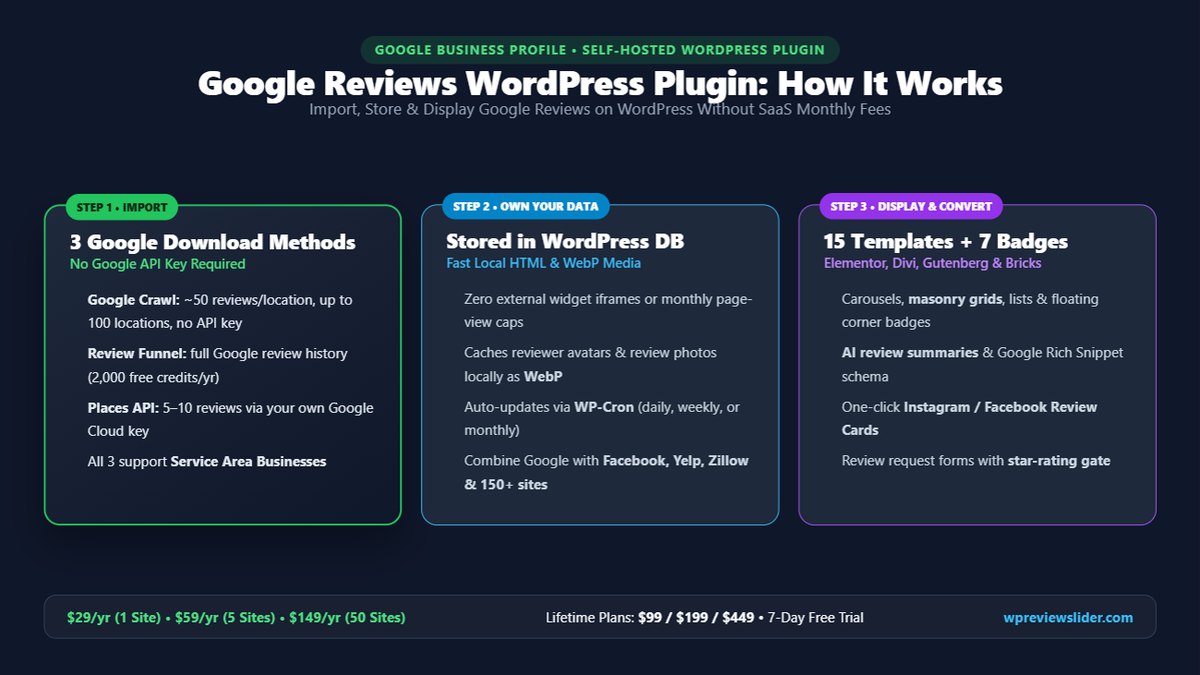
Google Review Download Methods: Technical Facts
Unlike single-method Google review widgets, WP Review Slider Pro includes three built-in ways to fetch Google reviews inside the same plugin so you can pick the right balance of zero-key simplicity, historical depth, or official API access:
| Google Method | API Key Needed? | Reviews & Location Limit | Service Area Businesses (SAB)? | What Is Imported & Stored | Auto-Update Schedule |
|---|---|---|---|---|---|
| 1. Google Crawl (Most Popular) | No API Key | ~50 reviews per location (Most Relevant or Newest) across up to 100 locations per site. | Yes — enter Place ID or business name + city. | Reviewer name, star rating, date, full text, owner reply, local WebP avatar, and customer review photos. | Daily, Every Other Day, Weekly, Biweekly, or Monthly via WP-Cron. |
| 2. Google Review Funnel | No API Key | Full public review history (hundreds of past reviews). Includes 2,000 free credits/year on all Pro plans. | Yes — Place ID or Search Terms. | All historical reviews, star ratings, dates, owner replies, local avatars, and customer photos. | Scheduled incremental syncs via WP-Cron. |
| 3. Google Places API (Official) | Your Google Key | 5 Most Relevant, 5 Newest, or Both (~10 reviews) per request; best for directory sites. | Yes — dedicated Service Area Business checkbox. | Reviewer name, star rating, date, review text, language filter, and cached avatar. | Daily, Weekly, or Monthly via WP-Cron; can run alongside Google Crawl. |
What Google Sliders & Rating Badges Look Like on WordPress
Every Google review template and summary badge renders clean, self-hosted HTML right inside your page response—with optional verified checkmarks, “Read More” expansion, AI-generated praise summaries, customer photo lightboxes, and floating corner pop-ups:

Shortcode: [wprevpro_usetemplate tid="1"] (or Gutenberg Block)
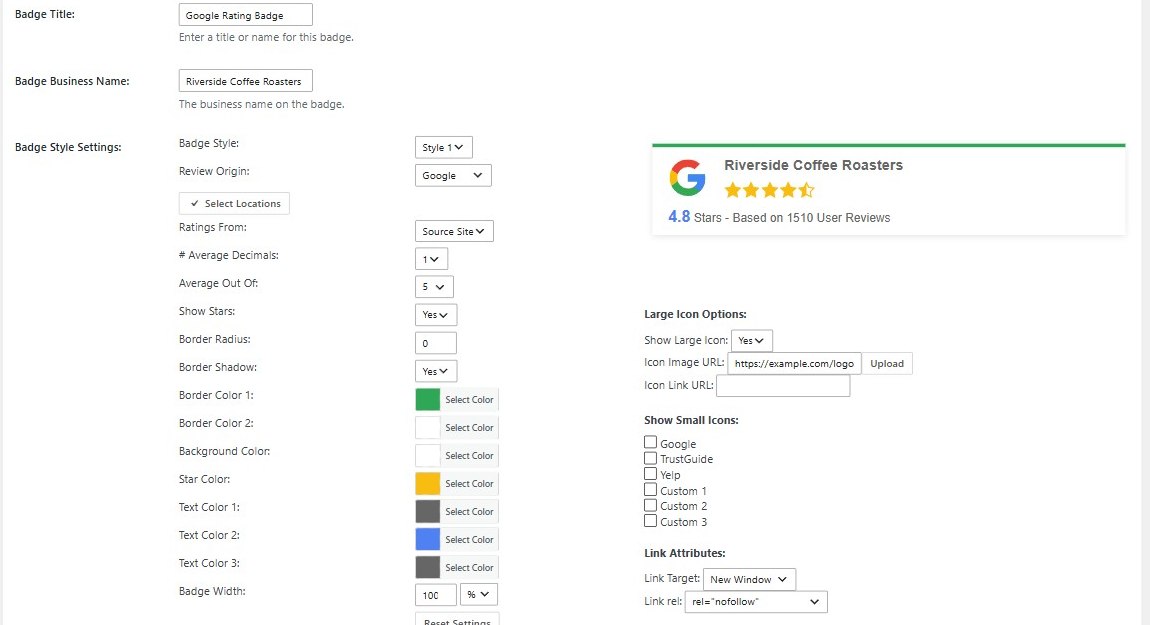
Shortcode: [wprevpro_usebadge tid="1"] (Header, Footer, or Float)
How to Embed Google Reviews on WordPress in 5 Steps
Step 1: Open Get Reviews & Pick Your Google Download Method
In your WordPress dashboard, open WP Reviews Pro → Get Reviews, click Add Review Source Site, and click the Google tile. Choose Google Crawl for ~50 reviews with zero API setup, Review Funnel for your complete historical review archive, or Google Places API to use your own key.
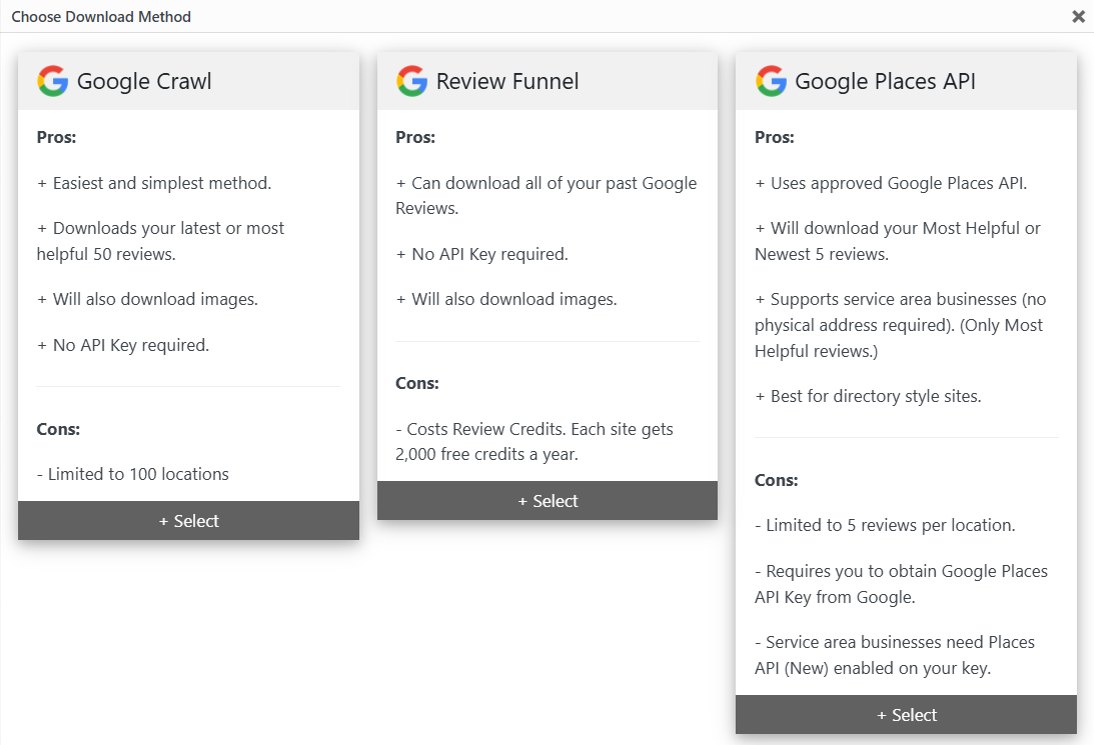
Step 2: Enter Your Google Place ID or Business Name + City
Give the location a unique Place or Location Name (so multiple branches stay separate), then paste your ChIJ... Place ID or type your business name and city into Place ID or Search Terms. Leave Local Profile Images and Local Review Images set to Yes so avatars and review photos are saved locally as WebP. Need help finding your ID? Use our 30-second Google Place ID guide or our no-API-key Google tutorial.
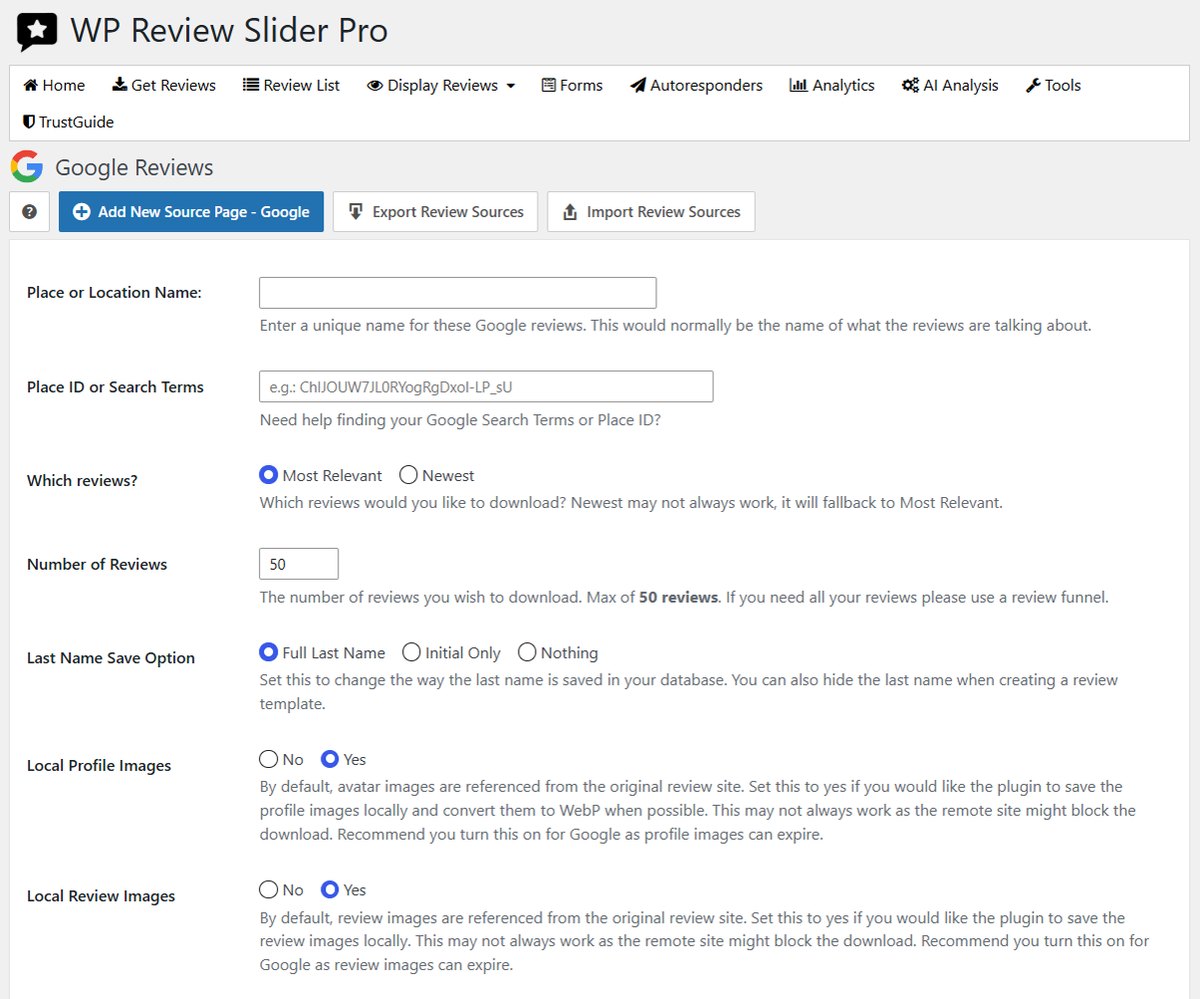
Step 3: Click Save & Test, Download, and Schedule Auto-Updates
Click Save & Test to verify the listing, then run the download. Your Google reviews, star ratings, owner replies, and photos appear immediately on WP Reviews Pro → Review List. On the Get Reviews screen, set your automatic update interval so WordPress cron checks Google in the background—never slowing down front-end visitors.
Step 4: Optional — Add Multi-Location Branches or Other Review Sites
Have multiple offices, storefronts, or service areas? Add up to 100 Google locations on one site license, or import Facebook, Yelp, TripAdvisor, Zillow, and 150+ other platforms into the same Review List. (Prefer using your own Google Cloud key? Follow our step-by-step Google Places API key guide.)
Step 5: Place Your Review Slider, Masonry Grid, or Google Rating Badge
Go to WP Reviews Pro → Templates (or Badges), pick from 15 template styles or 7 badge layouts, filter by minimum star rating, keyword, language, or specific location, and drop the block or shortcode into Elementor, Divi, Gutenberg, or your site header. For more design ideas, see How to Show Google Reviews on WordPress, 5 Google Review Setup Solutions, and How to Add a Google Review Badge.
WP Review Slider Pro vs. SaaS Google Review Widgets & Free Plugins
All pricing, storage models, and review limits verified November 2026 (also see our full 8 Best Google Reviews Plugins for WordPress comparison and Trustindex vs. WP Review Slider Pro breakdown):
| Feature | WP Review Slider Pro | WP Google Review Slider (Free) | Cloud SaaS Widgets (Trustindex / Elfsight) | Google Maps Iframe / Copy-Paste |
|---|---|---|---|---|
| Where reviews live | Your WordPress database (fast local HTML + WebP avatars) | Your WordPress database | Vendor cloud servers / external script | External iframe or static text |
| Google reviews imported (no API key) | ~50 via Crawl or All via Review Funnel | Up to 40 via Crawl | Free plugin capped at 10 reviews (Trustindex) or 200 monthly views (Elfsight) | None (map pin only) or manual typing |
| Multi-location pricing (e.g., 5 Google branches) | $29/yr covers up to 100 locations on 1 WordPress site | Multiple locations supported | $120–$125/yr (priced per profile or widget tier) | Manual per location |
| Service Area Business (hidden address) support | Yes — all 3 download methods | Yes | Varies by plan | Google Maps iframe often fails on SABs |
| Combine with 150+ other platforms + WooCommerce | Yes (160+ built-in sources + AI custom) | Google only | Paid cloud plans only; no native 2-way WooCommerce sync | No |
| AI Summaries, Social Cards, Forms & White-Label | All included in every plan | Pro upgrade | Extra cost or not available | No |
| Cost (1 WordPress site) | $29/year or $99 one-time lifetime (zero view caps) | Free on WordPress.org | $60–$65/year starter; no lifetime option | Free (high manual upkeep) |
Frequently Asked Questions: Google Reviews on WordPress
Do I need a Google Places API key or Google Cloud billing account?
No. WP Review Slider Pro includes a built-in Google Crawl method (~50 reviews per location, up to 100 locations) and a Review Funnel method (full past review history) that both run without a Google API key or Google Cloud billing account. If you prefer Google’s official endpoint, you can also connect your own Google Places API key.
Does WP Review Slider Pro work for Google Service Area Businesses (SABs) with a hidden address?
Yes. All three Google download methods in WP Review Slider Pro support Service Area Businesses that hide their street address on Google Maps. Google Crawl and Review Funnel accept either your Google Place ID or your business name plus city, and the Google Places API screen includes a dedicated This is a service area business checkbox.
How many Google reviews and Google Business Profile locations can I import on one WordPress site?
With Google Crawl, you can connect up to 100 Google Business Profile locations on a single $29/year Starter license and import roughly 50 reviews per location. If a location has hundreds of reviews and you want every historical review on your site, select Review Funnel on the Google popup; every Pro plan includes 2,000 free Review Funnel credits per year. You can display all locations together in one company-wide slider or filter individual templates by location for city landing pages.
Why do Google reviewer profile pictures break in other plugins, and how does WP Review Slider Pro prevent it?
Remote Google avatar and review photo URLs expire over time, leaving broken image icons on plugins that hot-link straight from Google. In WP Review Slider Pro, Local Profile Images and Local Review Images default to Yes: the plugin saves reviewer avatars and attached customer photos to your own server and converts avatars to lightweight WebP files.
Can I add Google review star schema (AggregateRating rich snippets) to WordPress?
Yes. Every template (More Settings → Google Rich Snippet) and rating badge has built-in Product, LocalBusiness, Organization, and Service JSON-LD schema that updates automatically as new reviews arrive. Note Google’s structured-data rules: Google generally does not display review star rich results in search for “self-serving” LocalBusiness or Organization schema about your own company, while Product schema on individual product pages remains eligible.
Does it work with Elementor, Divi, Gutenberg blocks, Bricks, and Beaver Builder?
Yes. WP Review Slider Pro includes a native WordPress block in the block editor plus standard shortcodes ([wprevpro_usetemplate tid="1"] for sliders/grids and [wprevpro_usebadge tid="1"] for summary badges) and a PHP template action (do_action( 'wprev_pro_plugin_action', 1 )). Because reviews render as clean server-side HTML from your database, they load fast in Elementor, Divi, Gutenberg, Bricks, Oxygen, and any WordPress theme.
What happens to my Google reviews if I cancel my annual subscription?
Unlike cloud SaaS widgets (such as Elfsight or Trustindex) that store your reviews on external servers and disable your widget if you stop paying or hit a monthly page-view cap, WP Review Slider Pro stores every review inside your own WordPress database. Your downloaded Google reviews, sliders, grids, and badges stay live on your site even if an annual license expires, or you can choose a one-time lifetime license ($99, $199, or $449).