

WP Review Slider Pro 12.7.15 is out, and the headline is a new tab called Review Cards. It turns any review you have already imported into a ready-to-post graphic for Instagram, Facebook, LinkedIn, or your newsletter. There are a few smaller fixes in this build, and since 12.7.13 and 12.7.14 slipped out without a post, we have rounded those up here too.
Shareable Review Cards
Your best reviews are already sitting in the plugin. Review Cards let you use them outside your website without retyping anything or opening a design tool. Open WP Review Slider Pro → Display Reviews → Review Cards, click Create Card, and pick a review from Google, Facebook, Yelp, or any of the other sources you have connected. The reviewer name, star rating, and text come straight from the review.
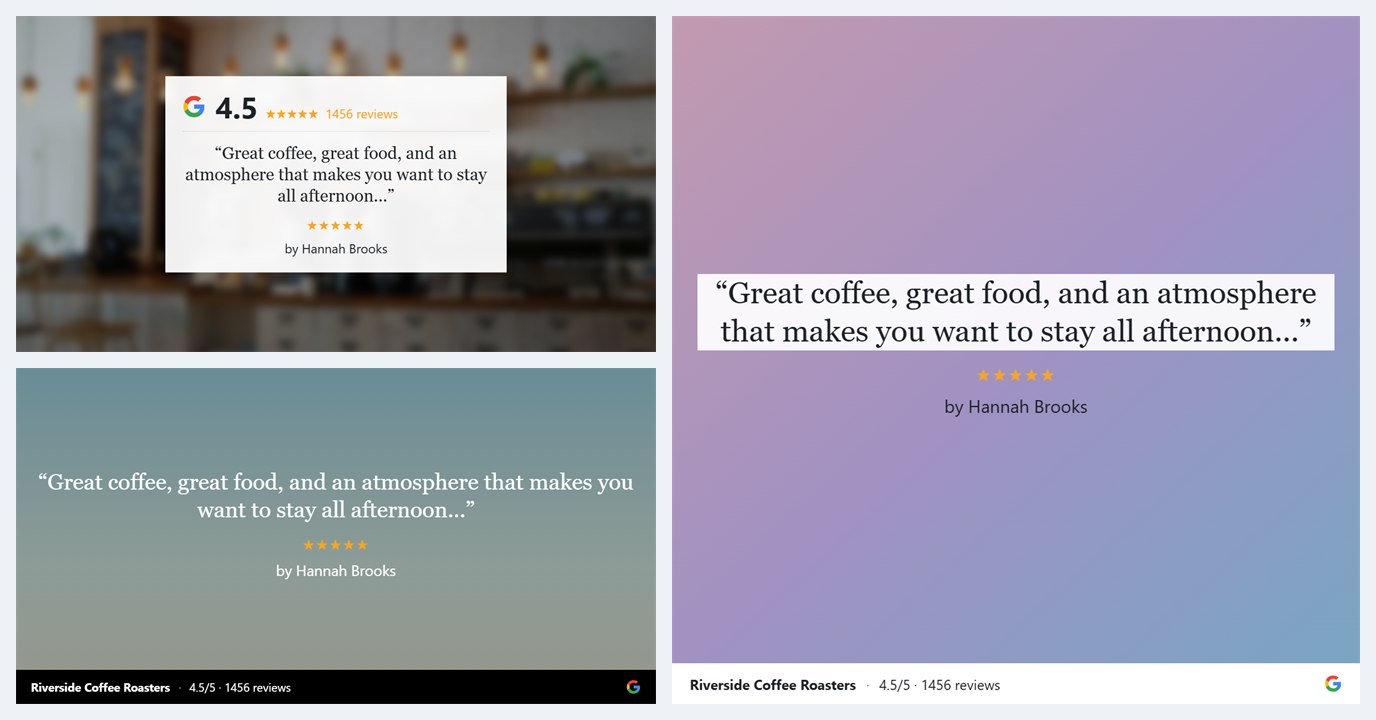
From there you choose a layout and a style. There are ten layouts in three families: Quote cards that put the review text front and center, Badge cards that add a panel with the source logo, your average rating, and total review count, and Review template cards that render the review with one of the plugin’s own slider templates so it matches your site. Each comes in landscape (1200 by 630) or square (1080 by 1080), and the quote and template families also offer 50% left and 50% right versions that leave half the card open for a photo.
Four style presets, Dark, Light, Blur, and Solid color, get you most of the way in one click. After that everything is adjustable: text size and star size, alignment, text color and background, bold and italic, and a footer strip with your business name, average rating, review count, and source logo. Click and drag across the review text to pick exactly which words appear on the card, and use the name format setting to show a full name, first name and initial, initials, or nothing.
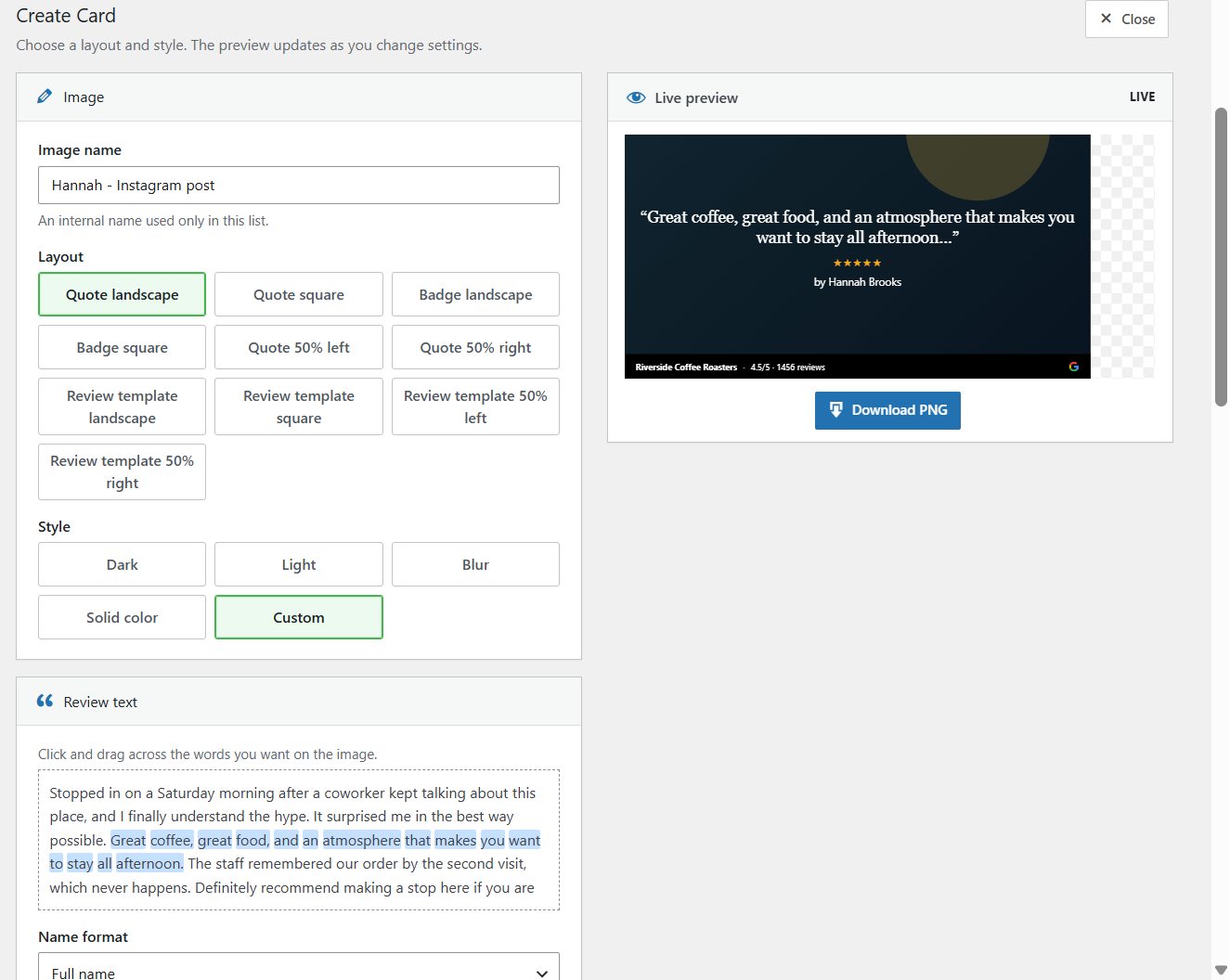
Backgrounds can come from the review itself (photos the customer attached), other reviews of the same location, six bundled abstract designs, your WordPress media library, a free Unsplash photo search built into the panel, or a solid color. Blur, fade, and contrast filters keep the text readable over a photo, and an arrow pad nudges the picture into place.

Save a card and it stays attached to the review with a thumbnail in the Review Cards list, so you can download it again or make a second version later. The Download PNG button gives you the full-size image. There is also a shortcut: every row in Review List now has an image icon that opens the card builder for that review.
Read the full walkthrough: How to Create Shareable Review Cards in WP Review Slider Pro. Feature overview: Shareable Review Cards.
Also in 12.7.15
- Facebook avatars refresh. The Facebook import now checks for expired profile photo URLs and updates them, so reviewer avatars stop going blank over time.
- “Time since” dates. The relative date option on review templates (“3 weeks ago”) now uses the built-in WordPress function, which respects your site language and timezone.
- Save button fix. On the Badges and Templates pages, the Save button could do nothing if the hidden Google snippet Post ID field held a 0. The field is now disabled until you choose a specific post, and a blank value is stored instead of 0.
- Freemius SDK updated to the latest version.
Catching up: 12.7.13 and 12.7.14
Two smaller releases went out between 12.7.12 and this one. If you skipped the changelog, here is what they added.
12.7.13
- Local Review Images option. The source forms on Get Reviews and Review Funnels have a new setting that decides whether review photos are saved to your media folder or left as remote URLs. It defaults to yes for Google and no for other sources. Saving locally keeps photos available if the original link disappears, which also matters for Review Cards.
- Fixed quotes in the Google Rich Snippet JSON output.
12.7.14
- Cleaner deletes. Deleting a review now also removes its local avatar, the template-cache avatar and thumbnails, and any downloaded review images. The same cleanup runs for Review List bulk deletes by type, page, and date, so old files no longer pile up in your uploads folder.
- Another Rich Snippet JSON fix.
- Loosened the Amazon duplicate check so legitimate reviews are not skipped on import.
Update from your WordPress dashboard to get 12.7.15, then open the new Review Cards tab and make one from your favorite review. If you missed the last big release, 12.7.12 added Autoresponders, Email Signatures, TrustGuide, and Agency White-Label. New to the plugin? Compare licenses on the pricing page.