
WooCommerce Reviews Plugin: Upgrade Default Product Reviews, Order Emails & Rich Snippets
WP Review Slider Pro upgrades default WooCommerce product reviews into conversion-ready photo grids, carousels, summary badges, automated post-order review request emails, auto-mapped Product rich snippets, and a Google Merchant Center XML feed—all stored inside your own WordPress database for $29/year or $99 lifetime. Whether you want to replace WooCommerce’s plain comment list or migrate off a monthly SaaS app, every tool ships in one lightweight plugin.
Start Your 7-Day Free Trial ($29/yr or $99 Lifetime) See 2-Way WooCommerce Sync Steps
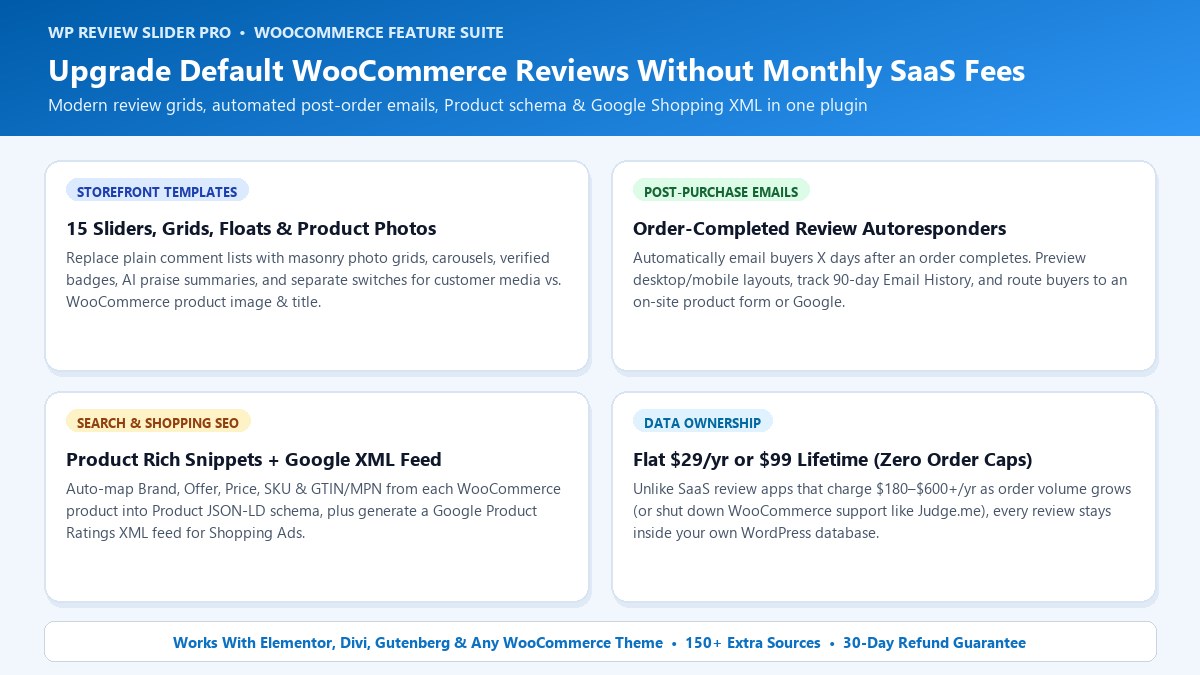
Default WooCommerce Reviews vs. WP Review Slider Pro
Out of the box, WooCommerce treats product reviews like standard 2012 blog comments—no carousels, no photo galleries, no post-purchase reminder emails, no storewide showcase, and no marketplace proof when launching a new product. Here is what changes when you add WP Review Slider Pro:
| Storefront Job | Default WooCommerce Tab | WP Review Slider Pro |
|---|---|---|
| Product & Storewide Layouts | Single plain comment list trapped inside one product tab | 15 responsive slider, masonry grid & list styles + 7 summary badges + corner floats anywhere on your store |
| Customer Photos, Videos & Product Thumbnails | Plain text only without extra add-ons | Customer photo/video lightboxes (including CusRev media sync) + dedicated Display WooCommerce product image and title toggle (v12.7.21) |
| Post-Purchase Review Collection | Buyers must remember to return on their own | Automated WooCommerce order completed Autoresponders with custom day delay, visual email builder, and 90-day Email History |
| On-Site Review Submission Forms | Basic comment box at bottom of product tab | Custom front-end popup/inline forms with star ratings, photo upload, QR codes, and Create WooCommerce Review database sync |
| SEO Rich Snippets & Google Shopping Ads | Theme-dependent schema; no Merchant Center feed | Auto-mapped Product JSON-LD schema (Brand, Offer, SKU, GTIN/MPN) + Google Product Ratings XML feed generator |
| Cross-Channel Social Proof | Zero external reviews (new products sit at 0 reviews) | Combine WooCommerce with 150+ sources (Google, Amazon, Etsy, eBay, Facebook, Yotpo, CSV) |
Four Core WooCommerce Features Inside One Plugin
1. Modern Product Grids, Storewide Sliders & Separate Media Switches
Replace or supplement the default WooCommerce review list with 15 customizable templates, verified-buyer icons, interactive “Read More” expansion, AI-generated review summaries, and accessible keyboard/screen-reader slider controls. Version 12.7.21 gives WooCommerce merchants two independent media switches under More Settings:
- Display Review Media: Shows customer-uploaded review photos and videos (including attachments pulled from Customer Reviews for WooCommerce).
- WooCommerce Product → Display WooCommerce product image and title: Displays the reviewed product’s thumbnail and linked title inside your review card—perfect for homepage, cart, and landing-page carousels.
2. Automated Post-Purchase Review Emails (Autoresponders)
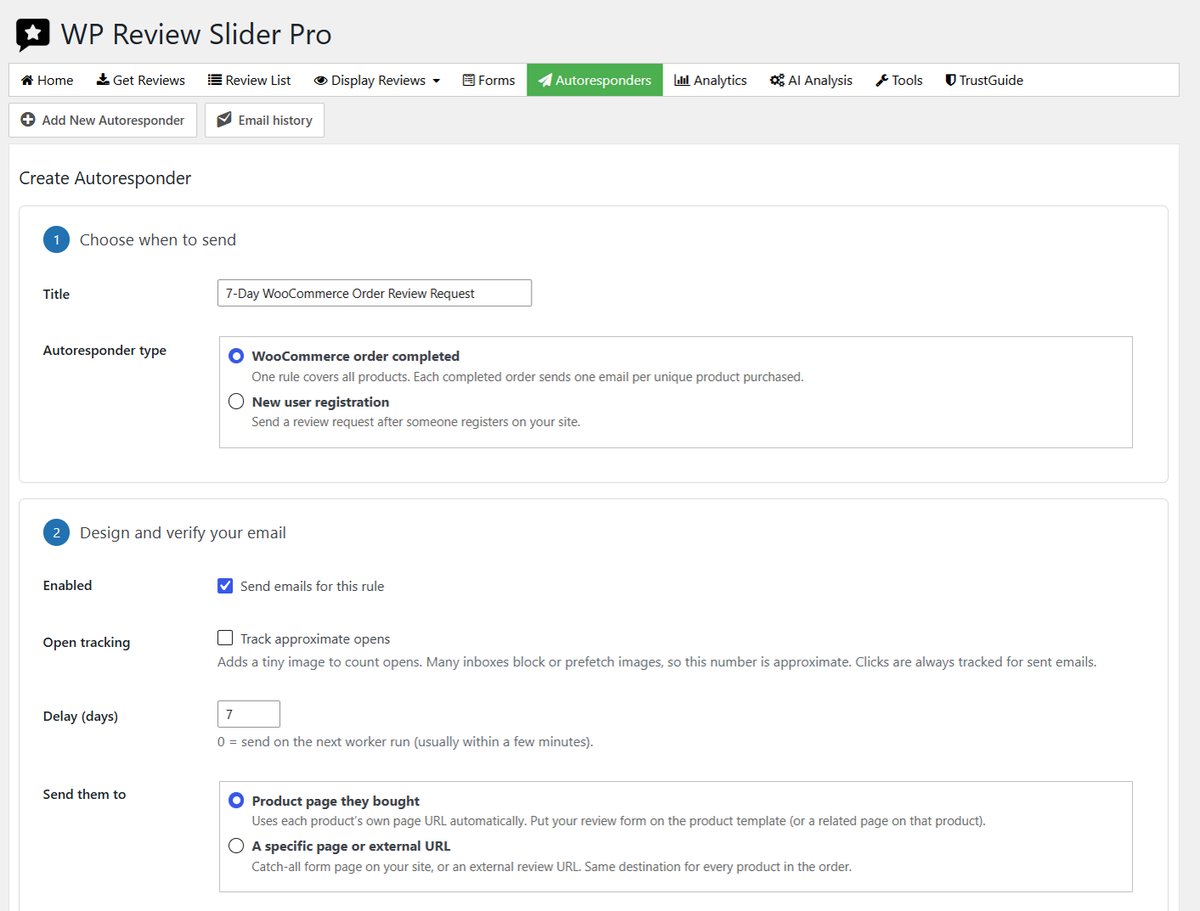
Most happy buyers never leave a review simply because nobody asked while the product was fresh in their hands. Under WP Reviews Pro → Autoresponders, choose the WooCommerce order completed trigger, pick your exact delay in days (for example, 7 or 14 days after fulfillment), customize your email with button and star-rating blocks, preview Desktop and Mobile layouts, send a test email, and monitor deliveries and opens in the 90-day Email history log.
You control the destination URL: send buyers to a product page with auto-open form arguments to build native WooCommerce reviews, or route repeat buyers to your Google Business Profile review link.
3. Auto-Mapped WooCommerce Product Schema (AggregateRating JSON-LD)
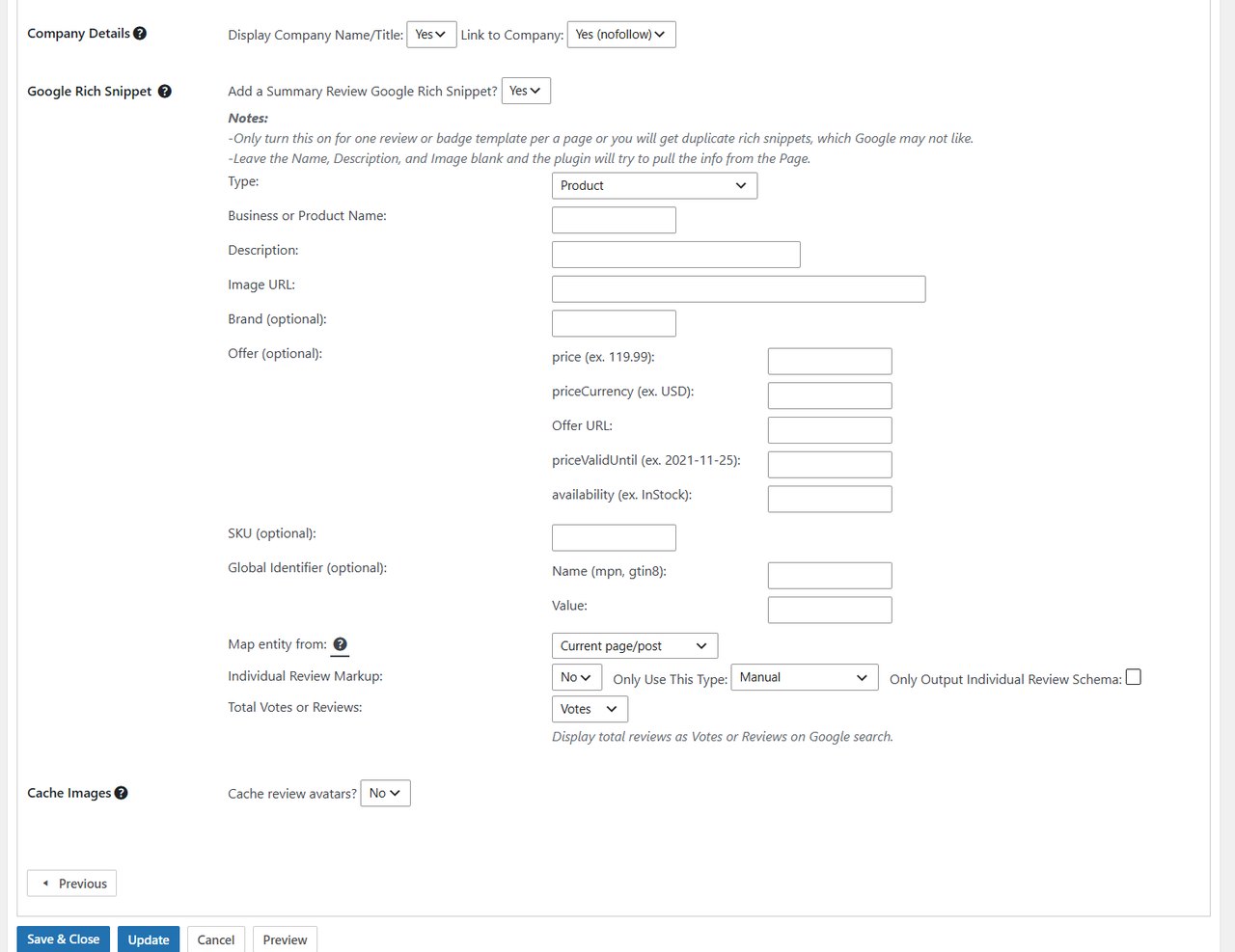
Unlike LocalBusiness schema (which Google restricts as “self-serving” on your own site), Product structured data on individual WooCommerce product pages remains eligible for Google review star rich snippets. On any template’s More Settings → Google Rich Snippet panel, set Type to Product and Map entity from to Current page/post (or a specific product ID). The plugin automatically maps product metadata alongside Brand, Offer (Price, Currency, Availability, Offer URL), SKU, and Global Identifiers (mpn, gtin8, etc.) while computing the live rating from the filtered reviews on that page.
4. Google Merchant Center Product Ratings XML Feed
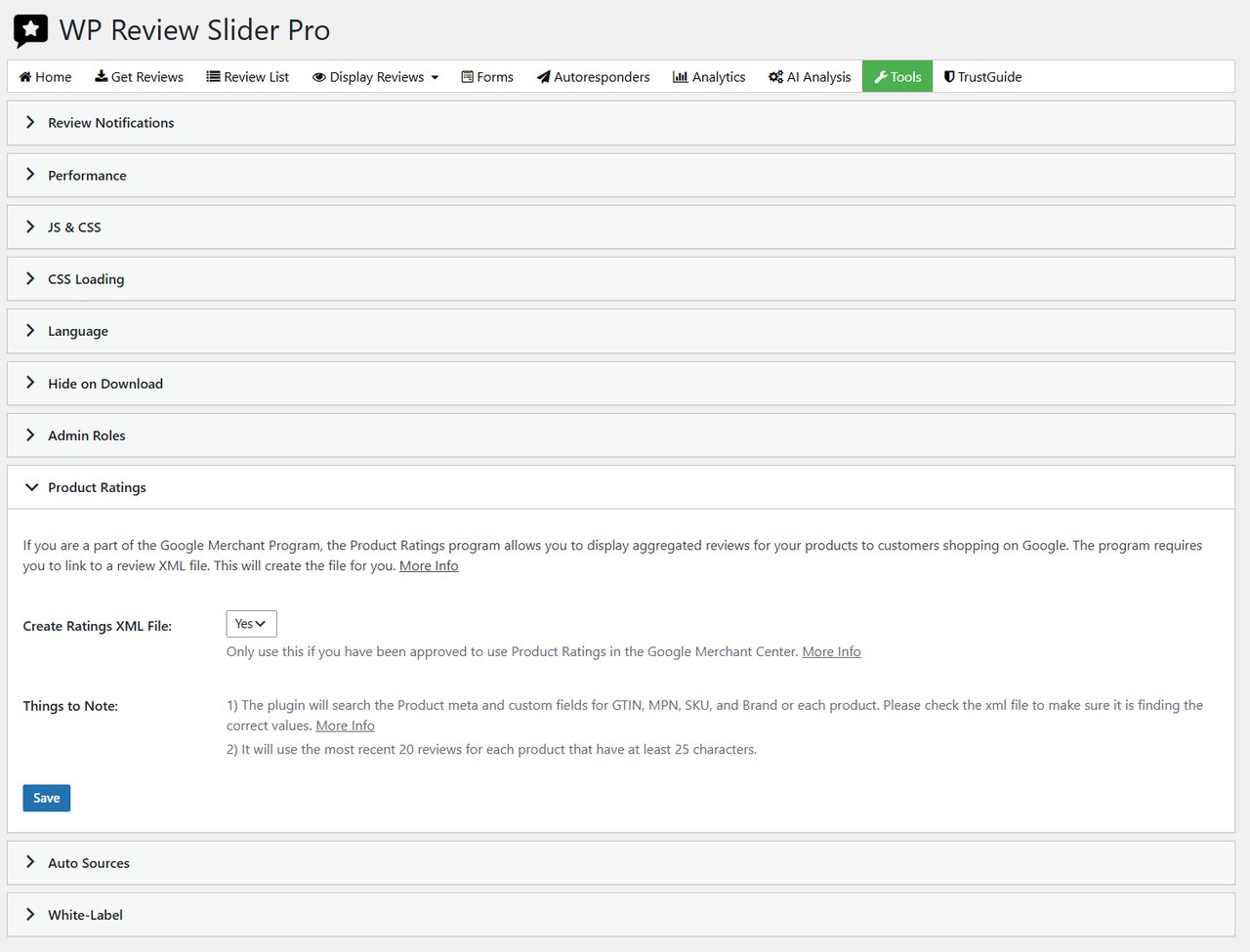
Running Google Shopping Ads or Free Product Listings? Open WP Reviews Pro → Tools → Product Ratings and set Create Ratings XML File to Yes. WP Review Slider Pro generates a ready-to-submit XML feed URL for approved Google Merchant Center Product Ratings accounts, automatically checking your WooCommerce product meta/custom fields for GTIN, MPN, SKU, and Brand and including the 20 most recent qualifying reviews (25+ characters) per product.
Leaving Judge.me, Yotpo, or Monthly SaaS Review Apps? Own Your Store Data
After Judge.me discontinued its official WooCommerce plugin in September 2025—and with cloud e-commerce platforms like Yotpo, Stamped, and Reviews.io charging $180 to $1,400+ per year as monthly order volume scales—thousands of WooCommerce store owners have moved back to self-hosted WordPress ownership.
- Interactive CSV Importer + Direct Sync: Upload your Judge.me, Loox, or Stamped CSV export on Review List (or connect Yotpo, Reviews.io, and Feefo directly under Get Reviews) and map reviewer name, star rating, date, review text, media, and product ID in minutes.
- Zero Order Caps or Traffic Fees: Process 50 orders a month or 50,000 orders a month for the same $29/year (1 store) or $99 one-time lifetime license.
- Fast Local HTML & WebP Avatars: Reviews render straight from your WordPress MySQL database with cached local images, protecting Core Web Vitals on high-converting product pages.
Import 150+ SitesReview TemplatesReview BadgesForms & AutorespondersAI Review AnalysisReview CardsEmail Signatures
Frequently Asked Questions: WooCommerce Review Features
Can I replace the default WooCommerce reviews tab with WP Review Slider Pro?
Yes. Many store owners hide or replace the default WooCommerce reviews tab in their theme or builder (Elementor, Divi, Bricks, Gutenberg block themes) and insert a WP Review Slider Pro template block with Filter By Post/Product enabled, paired with a front-end submission form set to Create WooCommerce Review. You can also keep the native WooCommerce tab active and use WP Review Slider Pro for photo grids, storewide sliders, badges, and post-order emails.
How do automated WooCommerce review request emails work?
Go to WP Reviews Pro → Autoresponders → Add New Autoresponder and select WooCommerce order completed. Set the delay in days after order completion, design your email using built-in star-rating and button blocks, test it on Desktop and Mobile, and save. WordPress cron sends the email automatically and logs delivery and opens for 90 days under Email history.
Does WP Review Slider Pro output Product rich snippet stars in Google Search?
Yes. On your single-product review template, open More Settings → Google Rich Snippet, choose Type: Product, and set Map entity from to Current page/post. The plugin outputs valid Product + AggregateRating JSON-LD mapped to your WooCommerce product details (Brand, Offer price/currency/availability, SKU, and GTIN/MPN). Only enable rich snippets on one template or badge per page to avoid duplicate markup.
What is the Google Product Ratings XML file under Tools?
Under WP Reviews Pro → Tools → Product Ratings, setting Create Ratings XML File to Yes builds a product-review XML feed for merchants approved in the Google Merchant Center Product Ratings program (used for stars on Google Shopping listings). It automatically checks product custom fields/meta for GTIN, MPN, SKU, and Brand. It is separate from Google Business Profile local reviews.
How do I migrate my reviews from Judge.me, Loox, Yotpo, or Stamped to WooCommerce?
Export your reviews CSV from Judge.me, Loox, or Stamped and upload it via the interactive column mapper on WP Reviews Pro → Review List—or connect Yotpo, Reviews.io, and Feefo directly on Get Reviews. Every imported review lives permanently in your WordPress database and can be pushed into native WooCommerce product comments if desired.
What if a new WooCommerce product has zero store reviews yet?
Because WP Review Slider Pro supports 150+ external review sources, you can import existing product reviews from Amazon, Etsy, or eBay for that item, or display a storewide badge/slider of your verified Google and Facebook company reviews until product-specific orders roll in.
How much does WP Review Slider Pro cost for a WooCommerce store?
Every WooCommerce feature—2-way sync, CusRev media import, 15 templates, 7 badges, Autoresponders, Product schema, Google Product Ratings XML, and 150+ review sources—is included in all Pro plans: $29/year (1 site), $59/year (5 sites), or $149/year (50 sites), plus $99 / $199 / $449 one-time lifetime options. Start with a 7-day free trial and 30-day money-back guarantee.