
WooCommerce Product Reviews Plugin: 2-Way Sync, Sliders & 150+ Sources
Yes — WP Review Slider Pro syncs directly with WooCommerce in both directions: it pulls your native WooCommerce product reviews (including Customer Reviews for WooCommerce photos and videos) into a central WordPress Review List, lets you mix them with Amazon, Etsy, eBay, and Google reviews, and can push imported or form-submitted reviews straight back to your WooCommerce products. Display product-specific review grids on single product pages or build a storewide review slider on your homepage with zero monthly order caps.
Start Your 7-Day Free Trial ($29/yr or $99 Lifetime) Explore All WooCommerce Features
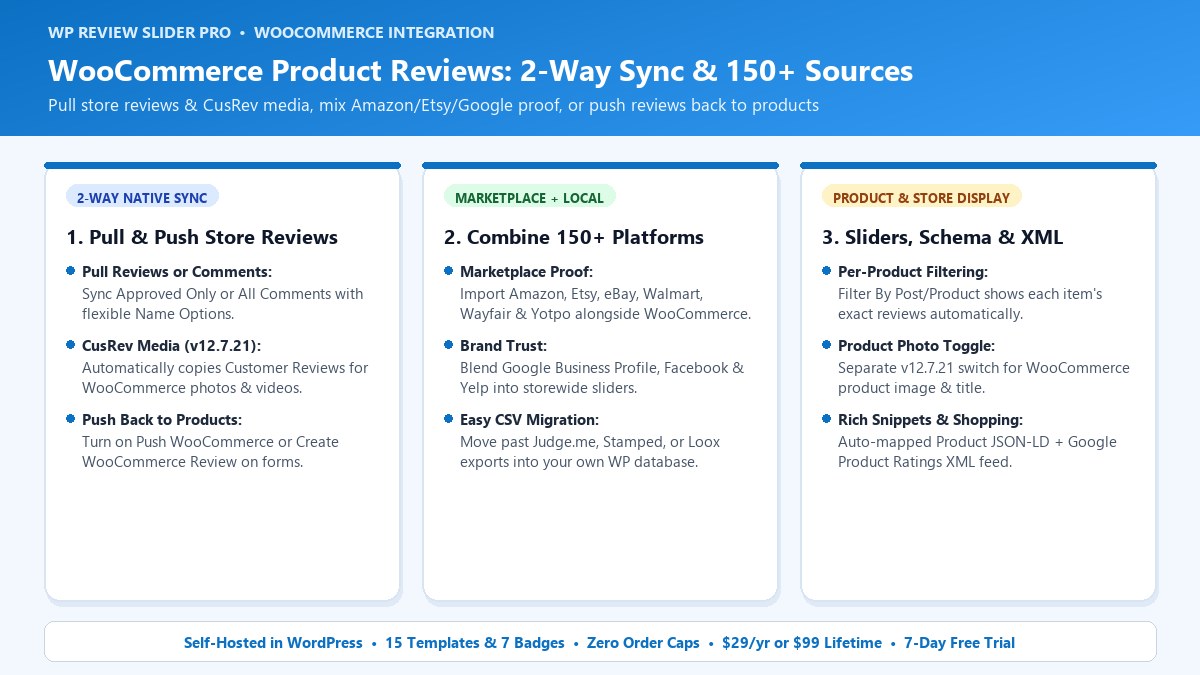
WooCommerce Sync & Import Capabilities: Technical Facts
Unlike single-purpose WooCommerce review tabs or pricey e-commerce SaaS widgets, WP Review Slider Pro treats your WooCommerce store as a native two-way source alongside external marketplaces and local business platforms:
| Sync / Import Path | Connection Type | What Is Imported or Synced | Product Linking & Media | Update Behavior |
|---|---|---|---|---|
| 1. Pull WooCommerce Reviews & Comments | Native Local DB | Reviews, Comments, or Reviews & Comments (Approved Only or All Comments), with Username, First Name, Last Name, or First & Last Name options plus optional Default Rating (1–5). | Automatically linked to each WooCommerce product’s Post ID; optionally displays product photo & title. | Instant sync on save + automatic updates as new WooCommerce reviews are approved. |
| 2. Customer Reviews for WooCommerce (CusRev) Media | Added in v12.7.21 | Automatically copies buyer-uploaded photos and videos (ivole_review_image & ivole_review_video fields) onto the review record when WooCommerce reviews are pulled. |
Displayed via More Settings → Display Review Media lightbox (separate from product thumbnail). | Synced automatically whenever WooCommerce reviews are pulled. |
| 3. Push to WooCommerce & Front-End Forms | 2-Way Write-Back | Turn on Push WooCommerce: Yes or enable Create WooCommerce Review on any front-end submission form to copy reviews into native WooCommerce product comments. | Links directly to the target product ID so native WooCommerce star counts stay current. | Immediate on form submission or review sync. |
| 4. Marketplace & CSV Imports (Amazon, Etsy, eBay, Yotpo, Judge.me) | Direct / Funnel / CSV | Import product reviews from Amazon, Etsy, eBay, Walmart, Wayfair, Yotpo, Reviews.io, Feefo, or CSV exports from Judge.me, Loox, and Stamped. | Tag imported reviews with a WooCommerce Post ID to show them on that exact product page or storewide. | Scheduled WP-Cron syncs; 2,000 free Review Funnel credits/yr included. |
WooCommerce order completed Autoresponders • Search & Shopping: Auto-mapped Product JSON-LD schema + Google Product Ratings XML feed • Pricing: $29/yr (1 store), $59/yr (5 stores), $149/yr (50 stores) or $99 / $199 / $449 one-time lifetime (zero monthly order limits; 7-day trial & 30-day refund). Need a free WooCommerce-only starter? Try our free Review Slider for WooCommerce plugin on WordPress.org.Live Shortcodes & Storefront Placement Options
Drop product review carousels, photo-rich masonry grids, storewide trust badges, or customer review forms anywhere in WooCommerce using Gutenberg blocks, Elementor, Divi, Bricks, Flatsome, or standard WordPress shortcodes:

Shortcode: [wprevpro_usetemplate tid=”1″]
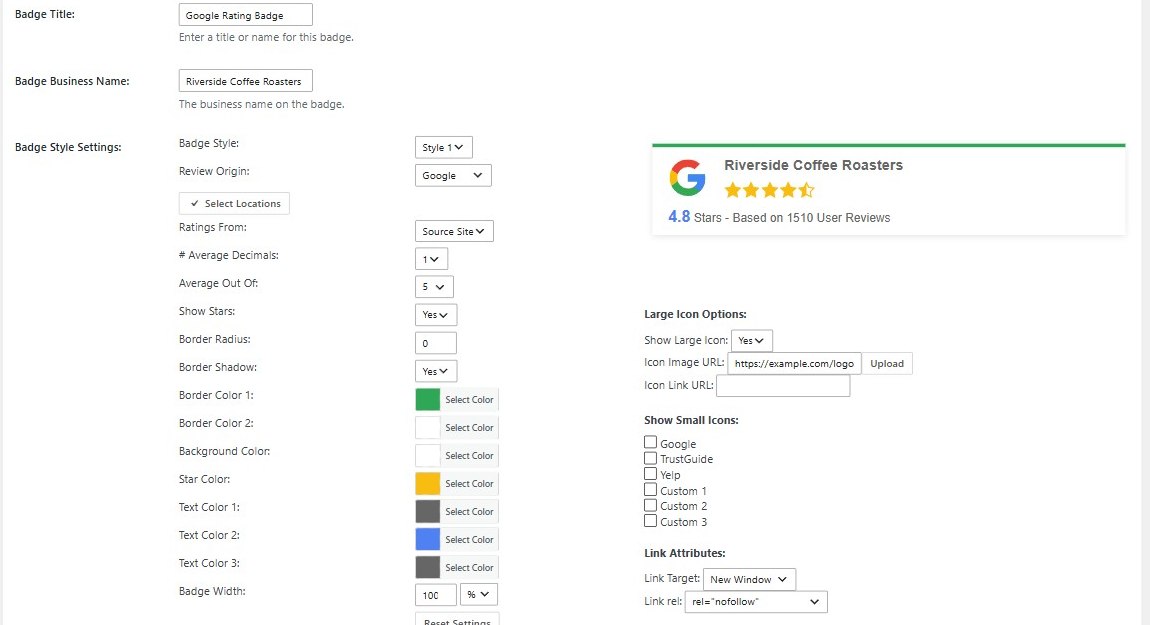
Shortcodes: [wprevpro_usebadge tid=”1″] [wprevpro_useform tid=”1″]
How to Sync & Display WooCommerce Reviews in 5 Steps
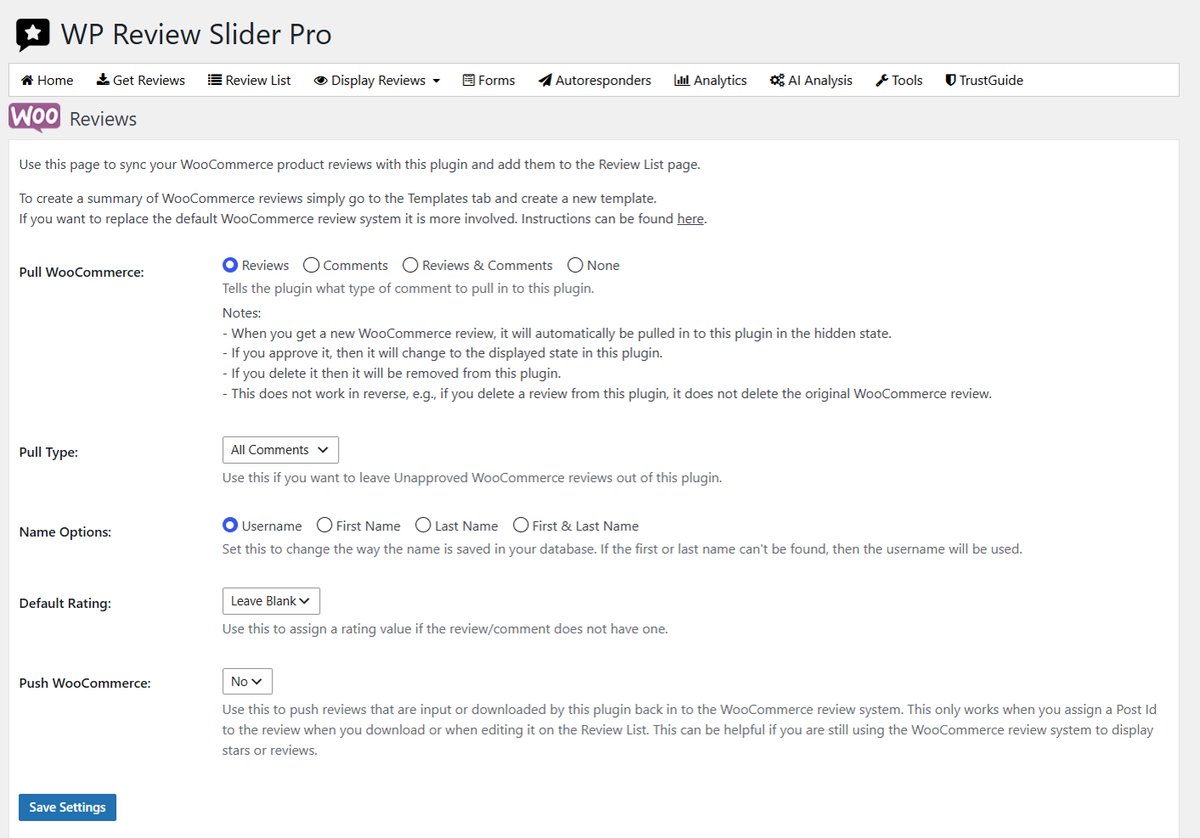
Step 1: Open Get Reviews → WooCommerce & Configure 2-Way Sync
In wp-admin, go to WP Reviews Pro → Get Reviews and click the WooCommerce tile (which opens its own dedicated sync screen). Set Pull WooCommerce to Reviews (or Reviews & Comments), pick Approved Only, choose how buyer names appear under Name Options (Username, First Name, Last Name, or First & Last Name), and click Save Settings. Every existing WooCommerce review—including attached Customer Reviews for WooCommerce photos and videos—syncs straight into Review List.
Step 2: Optional — Import Amazon, Etsy, Google, or Past CSV Reviews
Selling the same SKU on external marketplaces or migrating off a closed app like Judge.me? Add Amazon, Etsy, eBay, Yotpo, Reviews.io, Feefo, or Google Business Profile from Get Reviews, or upload your past CSV on Review List. Assign a product’s WordPress Post ID to any imported review if you want it tied to a single WooCommerce product.
Step 3: Choose Customer Media & Product Thumbnail Settings
Create a slider or masonry grid under WP Reviews Pro → Templates. On the More Settings tab, turn on Display Review Media to show customer-uploaded photos and videos, and set WooCommerce Product → Display WooCommerce product image and title (added in v12.7.21) to Yes—ideal for homepage carousels where shoppers want to see which product each buyer reviewed and click straight through to buy it.
Step 4: Filter Per Product Page or Display Storewide
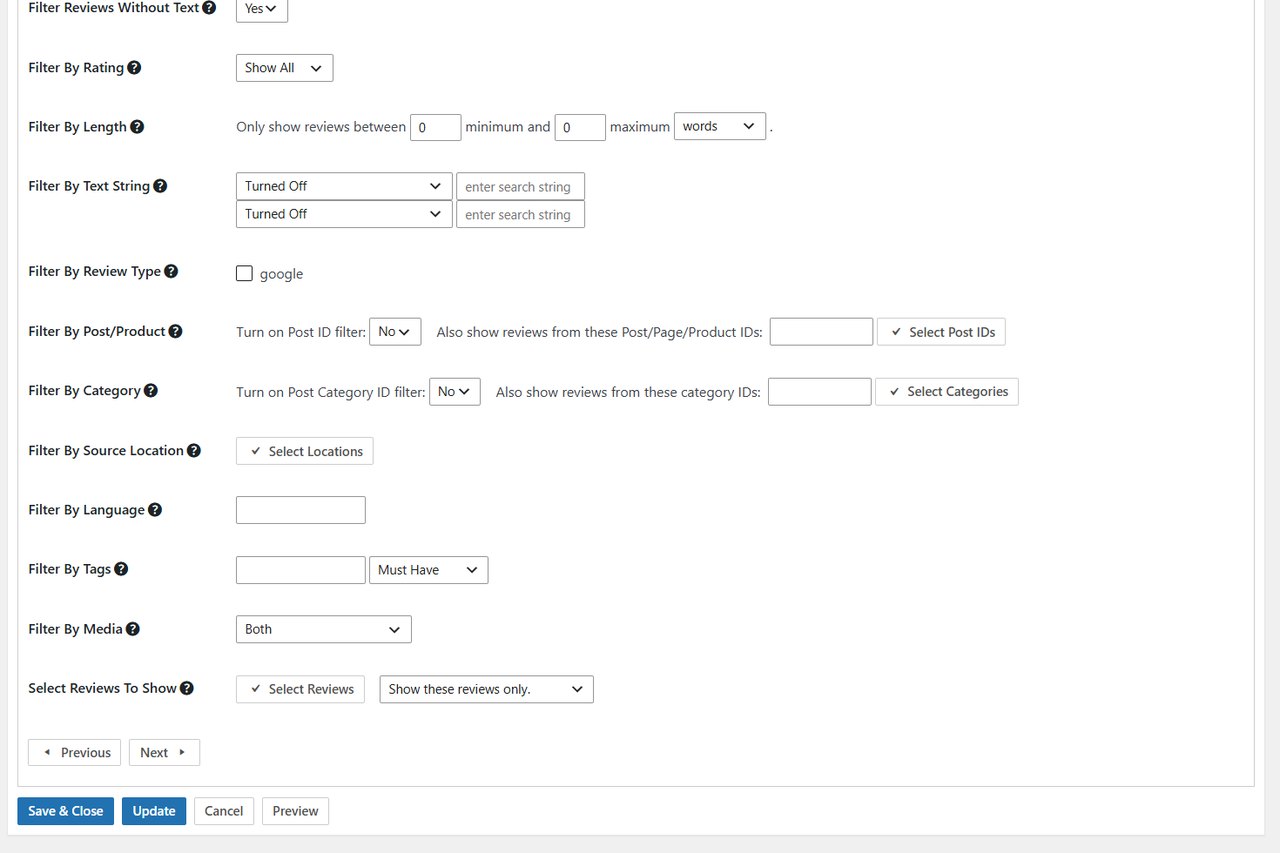
For a homepage or checkout trust slider, leave Post ID filtering off so your best storewide WooCommerce + Google reviews rotate together. For a single product template, open Filter Settings → Filter By Post/Product and set Turn on Post ID filter to Yes so each product page dynamically loads only reviews tagged with that product’s ID. (Tip: test this on the live product URL—the admin preview ignores Post ID filtering.)
Step 5: Turn On Order-Completed Review Requests & Product Schema
Set up an automated post-purchase email under WP Reviews Pro → Autoresponders (trigger: WooCommerce order completed) to collect fresh reviews on autopilot, and enable Product JSON-LD rich snippets or the Google Product Ratings XML feed when needed. Read our detailed walkthrough in How to Use WP Review Slider Pro for WooCommerce Product Reviews and How to Display WooCommerce Product Reviews Across Your Store.
WP Review Slider Pro vs. Default WooCommerce & E-Commerce SaaS Apps
All capabilities and pricing verified November 2026 (see our full 7 Best WooCommerce Product Review Plugins comparison and self-hosted vs. SaaS review widget hub):
| Capability | WP Review Slider Pro | Default WooCommerce Reviews | Review Slider for WooCommerce (Free) | SaaS Review Apps (Yotpo / Stamped / Loox) |
|---|---|---|---|---|
| Where reviews are stored | Your WordPress database (2-way WooCommerce sync) | WordPress comments table | Your WordPress database | External vendor cloud servers |
| Display layouts | 15 sliders, masonry grids & lists + 7 badges + floats | 1 basic vertical tab list | Starter WooCommerce slider/grid | Cloud JS widgets (slower front-end scripts) |
| Import Amazon, Etsy, eBay & Google | Yes — 150+ platforms + CSV + AI custom | No | WooCommerce only | Limited or requires enterprise tiers |
| Customer photos, videos & product image switch | Yes (including CusRev photo/video sync in v12.7.21) | Text only by default | Pro upgrade | Paid monthly plans |
| Automated post-order review request emails | Included (WooCommerce order completed) |
No | Pro upgrade | Metered by monthly order volume |
| Product JSON-LD schema & Google Shopping XML | Both included | Basic theme schema only | Basic | Often locked behind $49–$199/mo tiers |
| Annual / lifetime cost (500+ orders/mo) | $29/yr or $99 one-time lifetime (zero order caps) | Free | Free on WordPress.org | $180–$1,400+/year; Judge.me discontinued WooCommerce in Sept 2025 |
Frequently Asked Questions: WooCommerce Review Sync & Sliders
Can WP Review Slider Pro sync existing WooCommerce product reviews automatically?
Yes. Open WP Reviews Pro → Get Reviews → WooCommerce, choose Reviews (or Reviews & Comments), pick Approved Only, and click Save Settings. All existing and future WooCommerce product reviews sync into your Review List automatically while preserving each review’s link to its WooCommerce product ID.
Does it import customer photos and videos from Customer Reviews for WooCommerce (CusRev)?
Yes. Starting in version 12.7.21, when WP Review Slider Pro pulls WooCommerce reviews, it automatically copies customer photos and videos saved by the Customer Reviews for WooCommerce plugin (ivole_review_image and ivole_review_video fields) onto the review. Turn on More Settings → Display Review Media on your template to display them, independent of the product thumbnail.
How do I show only a single WooCommerce product's reviews on its product page?
Pulled WooCommerce reviews are automatically linked to that product’s WordPress Post ID. On your template, open Filter Settings → Filter By Post/Product and set Turn on Post ID filter to Yes. Place that single template shortcode or block into your WooCommerce single-product layout and every product page will automatically display only its own reviews. Check the live product page to verify, as the wp-admin preview does not apply Post ID filtering.
Can I show the reviewed WooCommerce product's photo and title inside a homepage slider?
Yes. When WooCommerce is active, templates include a dedicated switch under More Settings → WooCommerce Product → Display WooCommerce product image and title (added in v12.7.21). Set it to Yes so homepage or landing-page visitors see which item is being praised alongside a clickable link to the product, without affecting your customer review media settings.
Can I import Amazon, Etsy, or Judge.me CSV reviews and push them into WooCommerce?
Yes. You can import marketplace reviews from Amazon, Etsy, eBay, Walmart, Yotpo, Reviews.io, Feefo, or upload a CSV export from Judge.me, Loox, or Stamped via Review List. Tag reviews with the matching WooCommerce product ID, or enable Push WooCommerce: Yes / Create WooCommerce Review on front-end forms to copy reviews directly into WooCommerce.
Does WP Review Slider Pro charge extra as my monthly WooCommerce order volume grows?
Never. Unlike e-commerce SaaS platforms that meter pricing by monthly orders or review requests, WP Review Slider Pro runs entirely on your WordPress server for a flat $29/year (1 site), $59/year (5 sites), or $149/year (50 sites)—or $99 / $199 / $449 one-time lifetime—with unlimited orders, unlimited WooCommerce reviews, and unlimited front-end views.