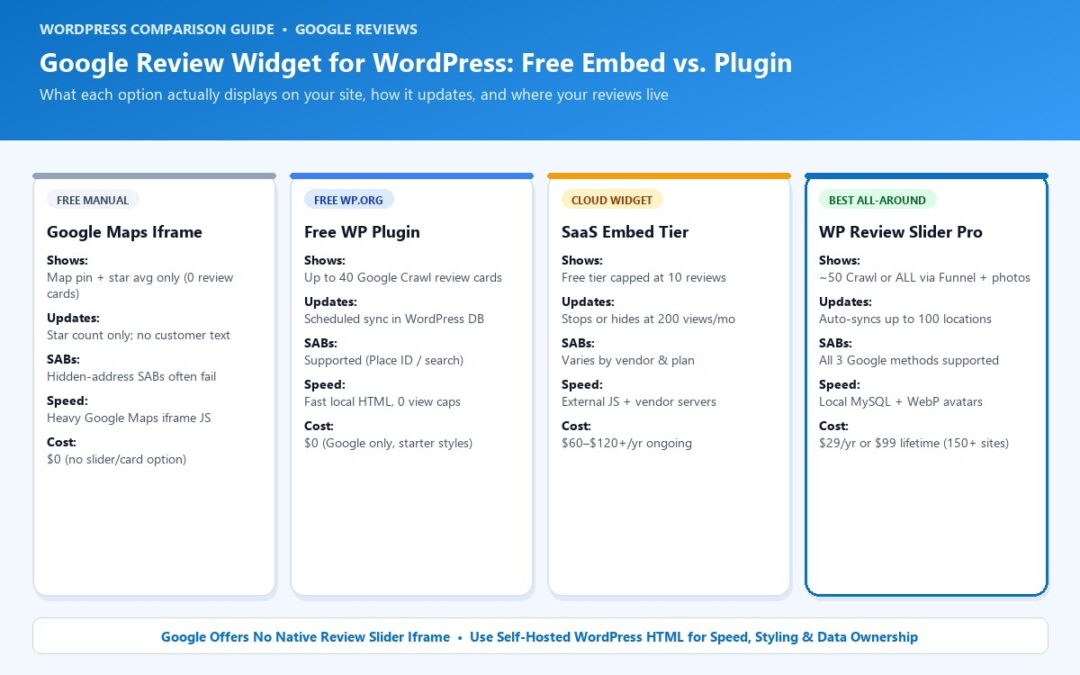
Google does not offer an official free HTML or iframe widget for displaying individual customer reviews—embedding a Google Map only shows your map pin, overall star rating, and total review count with zero customer quotes. To show real Google review cards, carousels, masonry grids, or rating badges on WordPress, use the free self-hosted WP Google Review Slider plugin (up to 40 Google Crawl reviews with no API key) or WP Review Slider Pro (~50 Google Crawl reviews across up to 100 locations, full Review Funnel history, 15 templates, 7 badges, and 150+ platforms stored in your own WordPress database).
- Google Maps Share → Embed a map: $0, shows map pin + average star score only (0 review cards), loads heavy Google Maps iframe scripts, and often fails on hidden-address Service Area Businesses.
- Free WordPress.org Plugin (WP Google Review Slider): $0, imports up to 40 Google Crawl reviews (or ~5–10 via Places API) into your WordPress database, zero monthly view limits, Google-only.
- Cloud SaaS Widget Free Tiers (Trustindex / Elfsight): Hosted on vendor servers; free plans stop auto-syncing after 10 reviews or hide your widget once you pass 200 monthly page views; paid plans run $60–$125+/year per location.
- WP Review Slider Pro: $29/year (1 site), $59/year (5 sites), or $149/year (50 sites)—or $99 / $199 / $449 one-time lifetime. Includes all 3 Google download methods (all supporting Service Area Businesses), local WebP avatars & customer photos, 15 templates, 7 badges, AI summaries, and 150+ review sites.
Why Doesn’t Google Offer a Free Review Slider Embed Code?
Every week, WordPress site owners open their Google Business Profile or Google Maps listing, click Share → Embed a map, paste the <iframe> into a Gutenberg Custom HTML block, and wonder why none of their 5-star customer reviews appear.
Google’s free map embed is strictly a directions widget, not a testimonial widget. Inside that small white overlay box in the top-left corner of the map, visitors see only your business title, address, star average (for example, 4.9 ★★★★★ 148 reviews), and a link that sends your hard-earned website visitor away to Google Maps. Worse yet:
- Zero customer text or photos: Visitors never read a single sentence explaining why buyers trust you.
- Service Area Business (SAB) issues: Plumbers, roofers, cleaners, mobile detailers, and consultants who hide their home street address on Google Business Profile often get a broken or city-wide map embed with no clear review card.
- Heavy third-party iframe scripts: A single Google Maps iframe pulls hundreds of kilobytes of external JavaScript on page load unless you wrap it in a click-to-load facade.
- Manual copy-pasting goes stale fast: Typing three quotes into WordPress columns is fast on day one, but static quotes have no live review count, no verified Google icon, and look self-typed to skeptical buyers.
Free Embed vs. Free Plugin vs. Cloud Widget vs. Pro Plugin: What Can Each Show?
Before installing anything, compare what each of the four WordPress approaches actually puts on the screen, where your review data lives, and what happens six months later:
| Feature / Limit | Google Maps Iframe / Manual Copy-Paste | WP Google Review Slider (Free Plugin) | Cloud SaaS Widgets (Trustindex / Elfsight) | WP Review Slider Pro (Self-Hosted Pro) |
|---|---|---|---|---|
| Individual review text & star ratings | Iframe: No (0 reviews) Copy-paste: Manual only |
Up to 40 Google Crawl reviews (or ~5–10 via API) | Free tier capped at 10 reviews; paid plans unlock more | ~50 via Google Crawl or Full history via Review Funnel |
| Google API key required? | No | No (built-in Crawl; optional API key) | No | No (Google Crawl & Funnel require zero API setup; optional Places API) |
| Customer review photos & owner replies | No | Basic text & avatar | Paid plans; avatars often hot-linked | Yes — local WebP avatars, attached customer photos & owner responses |
| Service Area Business (hidden address) | Often fails in map iframe | Yes (Place ID or search terms) | Varies by vendor | Yes — all 3 Google methods support SABs |
| Automatic background updates | Never (manual edits) | On-demand refresh / API cron | Free WP wrappers stop auto-syncing; paid cloud syncs | Scheduled WP-Cron (Daily, Every Other Day, Weekly, Biweekly, Monthly) |
| Monthly page-view limits | Unlimited | Unlimited | Elfsight free hides at 200 views/mo; paid tiers meter views | Unlimited traffic & views on every license |
| Layouts, badges, floats & AI summaries | 1 fixed map box | Starter slider / grid | Pre-set cloud skins; AI add-ons cost extra | 15 templates, 7 rating badges, corner floats, AI summaries & social cards |
| Combine Yelp, Facebook, WooCommerce & 150+ sites | No | Google only | Paid cloud tiers; no native 2-way WooCommerce sync | Yes — 160+ built-in platforms + 2-way WooCommerce sync |
| Where your reviews are stored | Google iframe / page text | Your WordPress database | Vendor’s external cloud servers | Your WordPress database (stays on your site even if canceled) |
| Real 1-site cost | $0 | $0 on WordPress.org | $60–$65/yr (1 profile); $120+/yr for multi-location | $29/year (up to 100 Google locations) or $99 lifetime |
What Can a Self-Hosted WordPress Plugin Show That an Embed Cannot?
Switching from a static embed to a native WordPress plugin unlocks three things search engines and human buyers immediately notice: complete review context, flexible download depth, and server-side design control.
1. Three Ways to Fetch Google Reviews (Including Hidden-Address SABs)
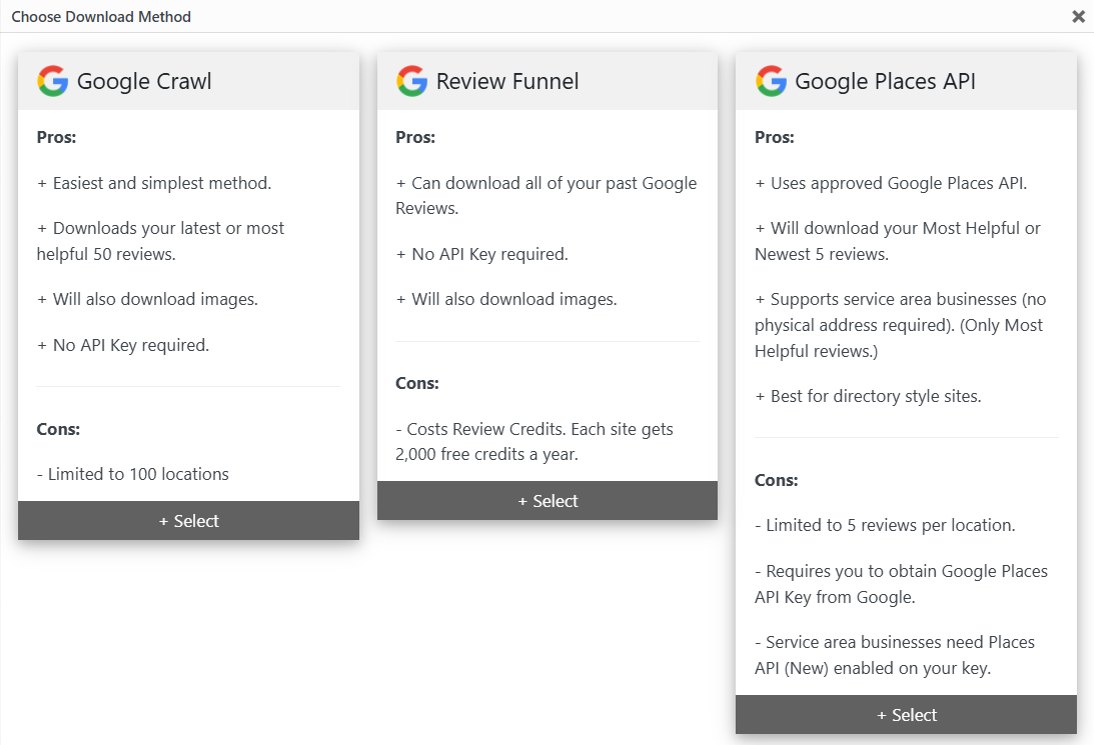
Most plugins lock you into a single connection method—either forcing you through Google Cloud Console billing to get 5 Places API reviews or relying on one scraper. Inside WP Reviews Pro → Get Reviews → Google, you pick the method that matches your location count and review volume:
- Google Crawl (No API Key): Enter your
ChIJ...Place ID or business name + city to import roughly 50 Most Relevant or Newest reviews per location across up to 100 locations on one WordPress site (see our no-API-key Google tutorial). - Google Review Funnel (Full Archive): Need 300+ historical Google reviews imported at once? Select Review Funnel—every Pro license includes 2,000 free Review Funnel credits per year.
- Google Places API (Official): Connect your own key for ~5–10 reviews per location, or use Tools → Auto Sources to generate Google feeds automatically from custom fields on directory sites.
2. Real Styling, Filtering, and Accessible Sliders Without Iframe Clutter
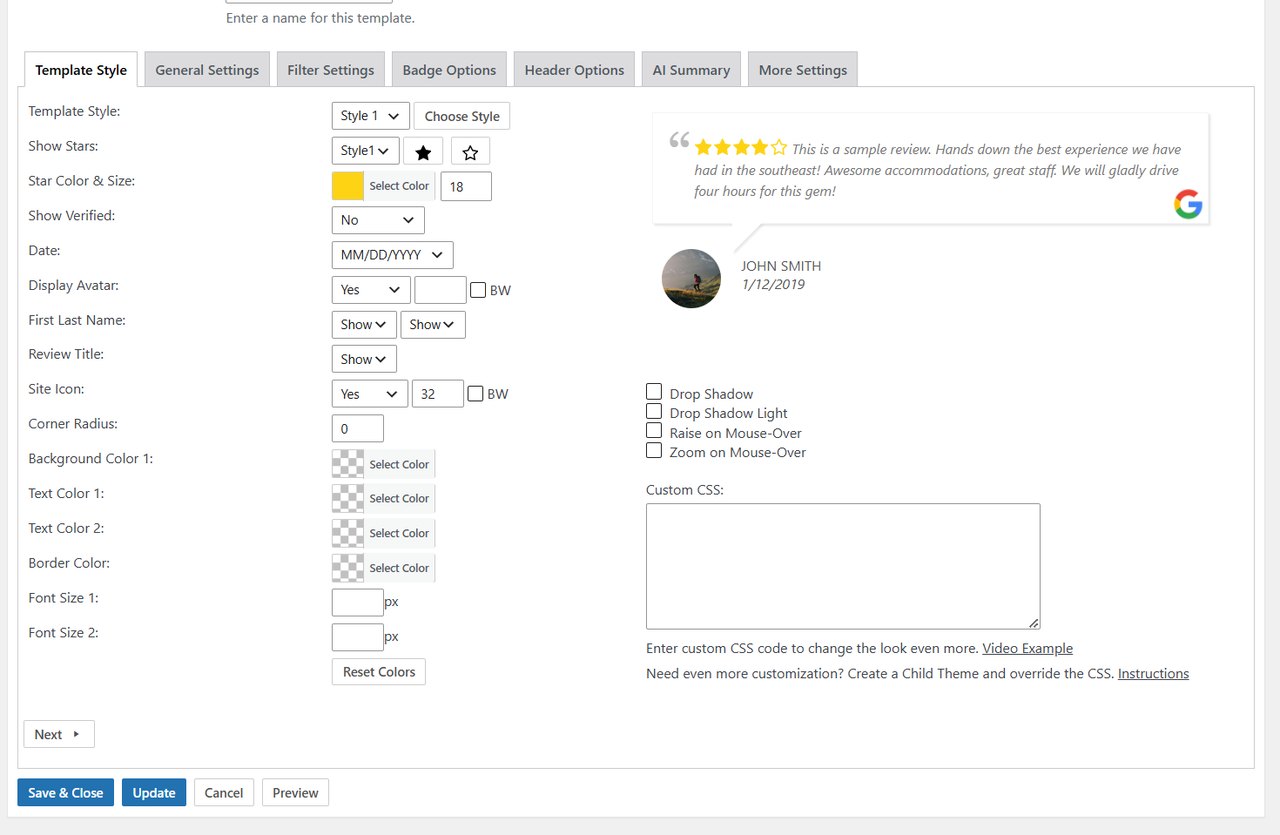
Because reviews are saved inside WordPress (wp_wpfb_reviews), you control every visual detail right inside WP Reviews Pro → Templates: pick from 15 slider, masonry grid, and list layouts, match your brand’s star color and typography, toggle verified checkmarks and “Read More” drawers, hide zero-text ratings, filter by minimum stars or keyword (great for service-specific landing pages), and preview changes live before dropping [wprevpro_usetemplate tid="1"] or the Gutenberg block onto any page.
3. Header Rating Badges, Sticky Corner Floats & Local WebP Photos
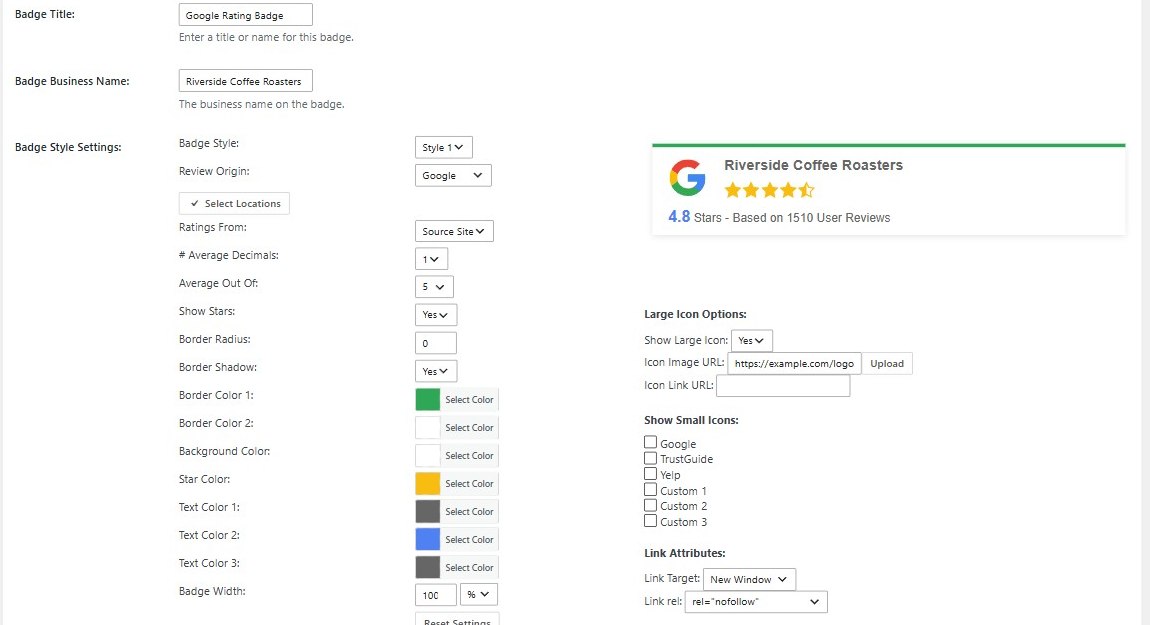
Not every page needs a full 3-column slider. With WP Reviews Pro → Badges ([wprevpro_usebadge tid="1"]) and Floats, you can place a compact 4.9 ★★★★★ Based on 240 Google Reviews trust badge in your site header, checkout sidebar, or bottom-right corner—and clicking it can slide open a live drawer of customer reviews. Even better, Local Profile Images and Local Review Images default to Yes, saving Google avatars and customer photos to your own server as fast WebP files so they never turn into broken image icons when Google rotates remote URLs.
Why Do “Free” Cloud SaaS Google Review Widgets Stop Updating or Disappear?
Many plugins in the WordPress directory advertise themselves as “Free Google Reviews Widgets,” only for site owners to discover two catches a week after launch (see our full self-hosted vs. SaaS review widgets breakdown and Trustindex alternative comparison):
- Frozen 10-review caps: Wrapper plugins download a one-time sample of 10 Google reviews and refuse to auto-sync new customer reviews unless you buy a $65+/year cloud subscription for each business profile.
- 200-view monthly shutoffs: Cloud embed tools like Elfsight count every single page load toward a tiny free-tier quota (200 views/month). If your homepage gets 10 visitors a day, your Google review widget goes blank before the third week of the month.
- Per-location pricing traps: Agencies or multi-branch businesses with 5 or 10 Google Business Profiles end up paying $120 to $300+ every year—whereas a single $29/year WP Review Slider Pro license supports up to 100 Google Crawl locations on one WordPress site.
Which Google Review Widget Should You Choose for Your WordPress Site?
- Only want a directions map on your Contact page? Use Google Maps’ free Share → Embed a map iframe—just don’t expect it to display customer testimonials.
- Need a $0 Google-only slider on a starter budget? Install our free WP Google Review Slider plugin from WordPress.org to import up to 40 Google Crawl reviews into your database with zero view caps.
- Running a revenue-generating business, multi-location brand, WooCommerce store, or client agency? Go straight to WP Review Slider Pro ($29/yr or $99 one-time lifetime) for automatic scheduled Google updates, customer review photo lightboxes, 15 templates, 7 badges, floating popups, AI praise summaries, white-label client mode, and 150+ platforms (Yelp, Facebook, Zillow, G2, Capterra, and WooCommerce).
Try WP Review Slider Pro Free for 7 Days
Import your Google Business Profile reviews in under two minutes—no Google API key required, local WordPress database speed, 15 templates + 7 badges, and a 30-day money-back guarantee.
Start 7-Day Free Trial ($29/yr or $99 Lifetime) See Full Google Integration Specs
Frequently Asked Questions: Google Review Widgets for WordPress
Does Google provide an official free HTML embed code for customer reviews?
No. Google Maps -> Share -> Embed a map only generates an iframe map showing your pin, business name, overall star average, and total review count—it never displays individual customer review text, avatars, or photos. To show actual review cards or a slider on WordPress, you need a review plugin.
What is the best completely free Google review widget plugin for WordPress?
WP Google Review Slider on WordPress.org (30,000+ active installs, 4.9 stars) is completely free, requires no Google API key, stores up to 40 Google Crawl reviews inside your own WordPress database, works for Service Area Businesses, and never enforces monthly page-view caps.
Why do some Google review plugins only show 5 or 10 reviews?
Google’s official Places API endpoint returns only 5 reviews per sort order (Most Relevant or Newest, or up to ~10 when fetching both), and freemium SaaS wrapper plugins cap their free tier at 10 reviews to push paid cloud upgrades. WP Review Slider Pro includes Google Crawl (~50 reviews per location with no API key) and Review Funnel (your complete historical review archive).
Can I embed Google reviews on WordPress if my business hides its street address (Service Area Business)?
Yes. While standard Google Maps iframes often fail or show a generic city map when a Service Area Business hides its street address, all three Google download methods in WP Review Slider Pro (Google Crawl, Review Funnel, and Google Places API) support Service Area Businesses using your Place ID or business name plus city.
Do Google review widgets slow down WordPress Core Web Vitals?
External iframe maps and cloud SaaS widgets load third-party JavaScript and remote Google avatar URLs on every page visit, adding extra DNS lookups and layout shifts. A self-hosted plugin like WP Review Slider Pro stores reviews in your local WordPress MySQL database and caches avatars locally as WebP images so reviews render as fast server-side HTML.
What happens to my Google reviews if I cancel WP Review Slider Pro?
Because every downloaded review, cached WebP avatar, and customer photo is saved inside your own WordPress database rather than on an external SaaS server, your existing reviews and sliders remain on your website even if an annual license expires. One-time lifetime licenses ($99, $199, and $449) are also available.